Inventory Overview
Maintaining current and accurate inventory information is an essential part of running a nursery. In eGrow Connect, inventory is managed using a transaction-based system. This means that each time you add, adjust, or sell inventory, it is done through a transaction. The transactional inventory system provides you with powerful historical information to make informed decisions about what and how much to grow.
eGrow also provides a mobile app which allows you to complete these inventory transactions in real time. You could have transactions being completed on mobile devices out in the field, removing the need to bring paper notes back to the office to record later. [Learn more about how the mobile app works].
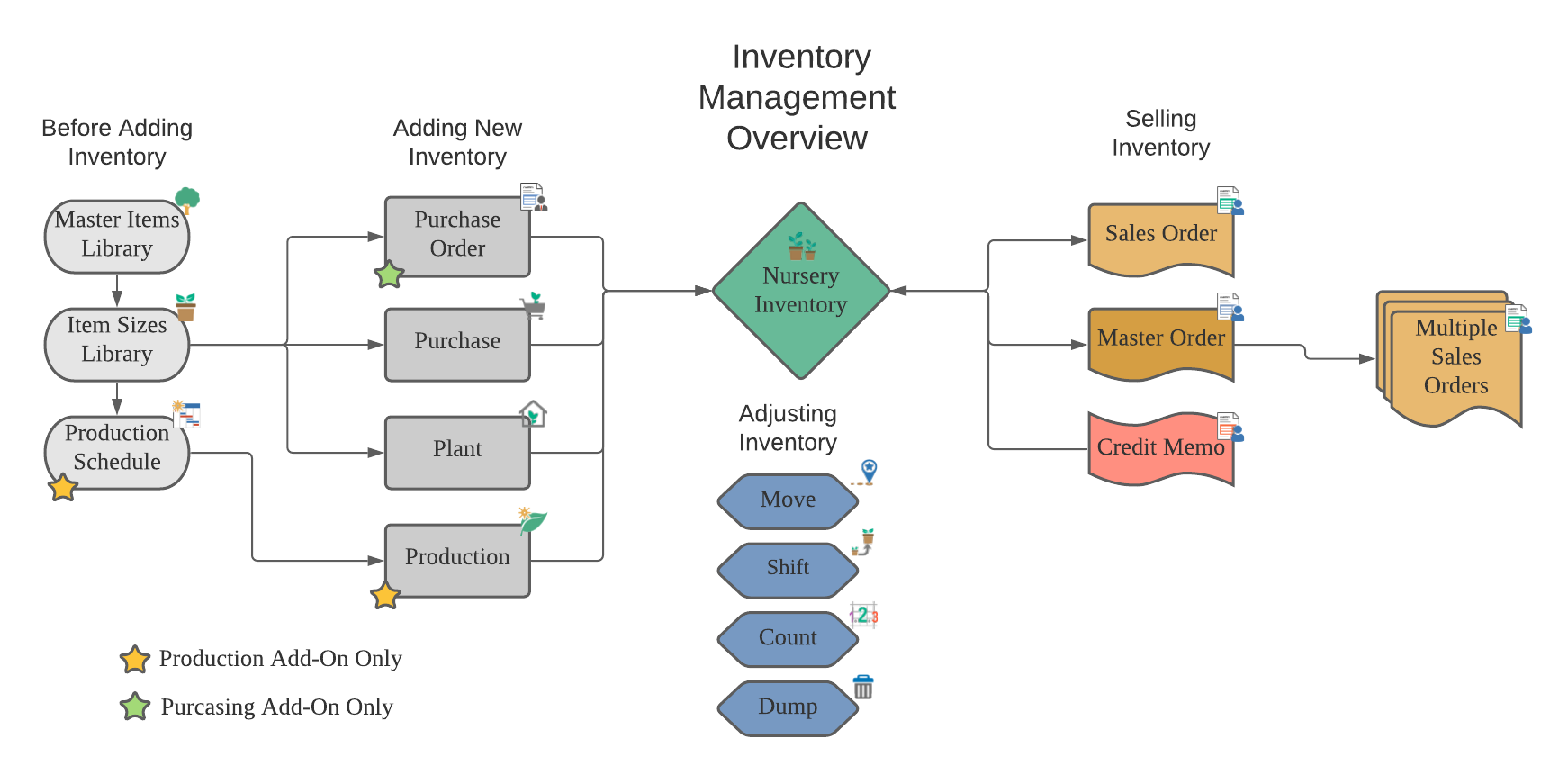
Before Adding Inventory
eGrow keeps a catalog of plants in two different libraries. Every item in your inventory must be included in both libraries.
- Master Items Library: a place to store plant names, botanical information, cultural information, and more for all the plant varieties at the nursery.
- Item Sizes Library: a library that stores information about each size of the items in the Master Items Library. Here you will store information such as pricing, dimensions, and more . This is also where items are given a Product ID which allows it to be entered into the inventory.
Note: In addition to setting up these libraries, you must also setup the locations and ready dates properly before you can add inventory.
Adding New Inventory
There are several transactions you can use to add inventory items.
 Plant when propagating new items yourself
 Purchase when buying inventory without using the Purchasing module
 Purchase Orders when using the Purchasing Add-On Module
 Production when using the Production Add-On Module to plan the production of new items using the production schedule.
Adjusting Inventory
Once items are included in the inventory there are transactions which can be used to adjust the sizes, locations, and quantities of crops.
Note: eGrow defines "crop" as a group of same items that share a location and ready date.
 Move to change the location of a crop
 Shift to transfer one product to another while at the same time updating the spacing, location, etc.
 Count to update quantities after a cycle count
 Dump when items are discarded
Selling Inventory
When selling inventory out of the nursery, you can use the following transactions.
 Sales Orders for more traditional one-time order
 Master Orders when a customer will reserve large amounts of inventory that will be shipped in multiple sales orders
 Credit Memos to credit customers after an order and can also return items to the inventory if indicated to do so